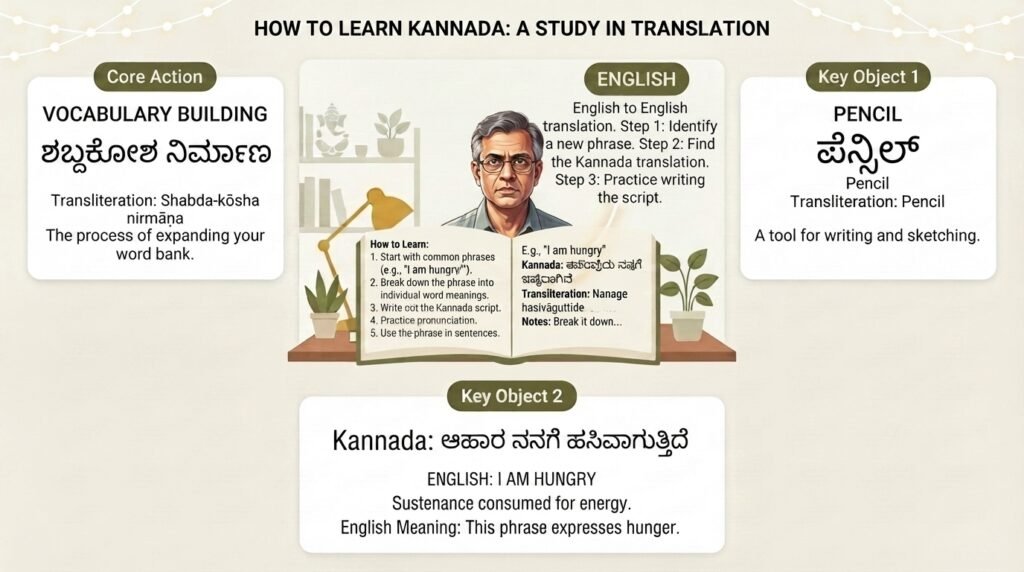
If you have ever tried to translate English to Kannada text and ended up with gibberish, you are not alone. Machine translation between these two languages is uniquely tricky because they belong to entirely different language families. English is Indo-European with a subject-verb-object order. Kannada is Dravidian with a subject-object-verb order, an agglutinative structure, and its own beautiful script. This guide walks you through what actually works, what fails, and how to get translations that native speakers will read without wincing.
Quick Answer: The fastest way to translate English to Kannada text is Google Translate, but for anything longer than a sentence or for professional use, combine machine translation with a native-speaker review. For single words and short phrases, English-Kannada dictionary apps like Shabdkosh or Kannada Baruthe give more accurate results than general translation tools.
Why English to Kannada Translation Goes Wrong So Often
The gap between English and Kannada is not just vocabulary. It is structural. Kannada packs entire English clauses into single compound words through a process called agglutination. A word like “maḍuvaḍillavē” means “did not do, right?” in English. That is five words collapsed into one. A translation tool that treats languages as word-for-word swaps will fail spectacularly here.
Three core problems trip up most translation attempts:
- Word order mismatch. English puts the verb between subject and object. Kannada pushes the verb to the very end. A tool that does not restructure the sentence produces Kannada that reads like Yoda wrote it.
- Agglutination failures. English expresses tense, negation, and question markers as separate words. Kannada glues them all onto the root verb as suffixes. When a translator misses this, the output is a string of disconnected word fragments.
- Script and phonetic confusion. Kannada uses an abugida script where consonants carry an inherent vowel. Transliteration tools often butcher this, producing Romanized Kannada that is unreadable or Kannada script with broken conjuncts.
According to a 2022 academic paper published by researchers at the International Institute of Information Technology Bangalore, English-to-Kannada machine translation systems consistently underperform on sentences longer than 15 words, with BLEU scores dropping by roughly half compared to shorter inputs. The same study noted that agglutination errors alone accounted for a significant portion of quality degradation.
Pro Tip: When using any machine translator for English to Kannada, break long sentences into shorter ones before translating. Aim for one idea per sentence. This single habit improves output quality more than anything else.
Understanding these structural differences is the first step. The next is knowing which tools handle them best.
Comparing the Top Tools to Translate English to Kannada Text
Not all translation tools are built the same way. Some prioritize speed, others prioritize grammatical accuracy. Here is how the major options stack up for English to Kannada specifically.
| Tool | Best For | Script Output | Accuracy on Long Text | Offline Support |
|---|---|---|---|---|
| Google Translate | General use, quick translations | Kannada script + Romanization | Moderate | Yes (app) |
| Microsoft Translator | Business documents, Office integration | Kannada script | Moderate | Yes (app) |
| Shabdkosh | Single words, dictionary-style lookups | Kannada script | N/A (word-level) | No |
| Kannada Baruthe | Phrase learning, colloquial usage | Romanized + script | Low (phrase-level) | No |
| Bhashini (Govt of India) | Government schemes, public service content | Kannada script | Improving | Yes (app) |
Google Translate remains the most accessible option, and its Kannada translation quality has improved noticeably since the introduction of neural machine translation models for Indian languages in 2017. However, it still struggles with honorifics, which matter a great deal in Kannada. Using the wrong level of formality can make a translated message sound rude or absurdly stiff.
Microsoft Translator integrates directly into Word, PowerPoint, and Outlook, which makes it convenient for business users who need to translate English to Kannada text within existing workflows. Its handling of formatting preservation is a genuine advantage for document translation.
Pro Tip: For important translations, run the same English text through two different tools and compare the outputs. Where they disagree, that is where the translation is most likely wrong. Focus your manual correction effort there.
The government-backed Bhashini platform deserves a mention because it is being actively developed for Indian language translation with a focus on domain-specific accuracy in areas like healthcare, agriculture, and legal aid. It is not yet as polished as the commercial options, but its trajectory is promising.
A Step-by-Step Process for Accurate English to Kannada Translation
Relying on a single tool click is a gamble. A structured process dramatically improves results, especially when you need to translate English to Kannada text for something that matters, like a website, a formal letter, or educational content.
Step 1: Prepare Your English Source Text
Write or edit the English text so it is translation-friendly before you touch a tool.
- Remove idioms and figurative language. “Break a leg” does not translate. Say “good luck” instead.
- Shorten sentences. As mentioned, keep sentences under 15 words where possible.
- Spell out abbreviations on first use. “WHO” could confuse a translator if the context is unclear.
- Use active voice. Passive constructions in English often produce awkward Kannada.
Step 2: Run the Machine Translation
Use Google Translate or Microsoft Translator for the first pass. If the text contains specialized terminology, test a few key terms first to see if the tool handles them correctly. If it does not, keep a glossary handy for manual replacement later.
Step 3: Back-Translate to Check Meaning
Take the Kannada output and translate it back to English using the same tool. Read the back-translation. Does it say what you intended? If the meaning has shifted significantly, the original translation is almost certainly wrong. This is the single most effective quality check available to non-Kannada speakers.
Step 4: Get Native-Speaker Verification
For anything that will be published or sent to a Kannada-speaking audience, this step is not optional. A native speaker can catch errors that back-translation misses, especially around tone, formality, and cultural appropriateness. Platforms like Upwork, Fiverr, or local language communities can connect you with qualified reviewers.
Step 5: Format the Kannada Script Properly
If you are publishing online, ensure the Kannada script renders correctly. Use UTF-8 encoding. Test on multiple devices. Broken script rendering is surprisingly common and instantly signals low quality to readers.
Pro Tip: Build a small glossary of frequently used terms for your specific domain. Machine translators are inconsistent with specialized vocabulary. A glossary lets you do quick find-and-replace corrections before finalizing any translation.
This process takes more time than a single click, but the quality difference is night and day.
Common Mistakes People Make When Translating English to Kannada
Even with good tools, certain errors show up repeatedly. Knowing them in advance helps you avoid them.
- Using Romanized Kannada as the final output. Some tools output Kannada words in the Latin alphabet. This is fine for learning pronunciation but terrible for communication. Most Kannada speakers read the Kannada script faster and with better comprehension. Always prefer script output for final use.
- Ignoring dialect differences. Kannada has several regional dialects. The standardized form used in most translation tools is based on the Mysore-Bangalore variety. If your audience is from North Karnataka or the coastal regions, some word choices may sound foreign to them. A native reviewer from the target region can adjust this.
- Translating names literally. Place names and personal names should typically be transliterated, not translated. “Mangalore” is already an anglicization of “Mangaluru.” Do not let a tool try to translate the meaning of a name.
- Forgetting about gendered verbs. Kannada verbs sometimes inflect for gender in certain tenses. A translation that gets the gender wrong can create confusion about who did what.
- Neglecting the zero copula. Kannada often omits the verb “to be” in present tense sentences. “He is a teacher” becomes “Avanu teacher” (literally “He teacher”) in natural Kannada. Over-literal translations insert unnecessary “ide” or “irutāne” constructions that sound unnatural.
Pro Tip: If you see a lot of “ide” and “irutāne” in your translated Kannada text, the translation is probably too literal. Natural Kannada uses the copula sparingly in present tense.
Awareness of these patterns makes you a better editor of machine-translated output, even if you do not speak Kannada fluently yourself.
When to Use a Human Translator Instead
Machine translation has limits. Knowing when to set the tools aside and hire a human translator saves time, money, and embarrassment.
Use a human translator when:
- The text is legal, medical, or financial in nature. Errors in these domains carry real consequences. A mistranslated dosage instruction or contract clause is not worth the risk.
- The content is creative or marketing copy. Slogans, taglines, and persuasive writing rely on cultural resonance and emotional tone that machines simply do not understand.
- The audience is older or less digitally literate. Older Kannada speakers may be less tolerant of awkward phrasing and more likely to dismiss machine-translated content as low-quality.
- The text is long-form (over 500 words). Machine translation quality degrades as context windows stretch. Human translators maintain consistency across longer documents.
Human translation for English to Kannada text typically costs between ₹1.50 to ₹4.00 per word depending on the complexity and turnaround time, based on rates commonly seen on Indian translation marketplaces. For a 1000-word document, that is a reasonable investment when accuracy matters.
Pro Tip: For mid-budget projects, use a hybrid approach. Machine-translate the document first, then hire a human editor to correct and polish the output. This is often faster and cheaper than translation from scratch, and the quality can be comparable if the editor is skilled.
The right approach depends on your stakes. A casual WhatsApp message to a Kannada-speaking friend does not need a professional translator. A product listing on an e-commerce site serving Karnataka absolutely does.
Key Takeaways
- Break sentences short before translating English to Kannada text. Long sentences are the number one cause of garbled machine output due to the structural mismatch between the two languages.
- Back-translate the Kannada output to English as a quick quality check. If the meaning shifts, the translation is flawed.
- Prefer Kannada script output over Romanized transliteration for any content meant for native speakers.
- Google Translate and Microsoft Translator are the best free tools, but neither handles honorifics, idioms, or long-form content reliably.
- Human review is non-negotiable for legal, medical, financial, or published content. A hybrid machine-plus-human workflow balances cost and quality effectively.
Frequently Asked Questions
Q: Is Google Translate accurate for English to Kannada?
A: Google Translate handles short, simple sentences reasonably well. For sentences under 10 words with straightforward vocabulary, accuracy is generally acceptable for casual use. However, it struggles with complex sentences, idioms, honorifics, and specialized terminology. Always verify important translations.
Q: Can I translate English to Kannada text offline?
A: Yes. Both the Google Translate and Microsoft Translator mobile apps allow you to download the Kannada language pack for offline use. The offline translation quality is slightly lower than the online version but still functional for basic needs.
Q: What is the best app to translate English to Kannada?
A: Google Translate is the most widely used and consistently updated option. For dictionary-style word lookups, Shabdkosh is excellent. Microsoft Translator is the best choice if you work within Microsoft Office applications regularly.
Q: Why does my translated Kannada text look like boxes or question marks?
A: This is a font or encoding issue, not a translation problem. Your device or application is missing a Kannada font. Install Noto Sans Kannada (a free Google font) or ensure your document uses UTF-8 encoding. Most modern smartphones and computers support Kannada script natively.
Q: How do I type Kannada script after translating?
A: After translating English to Kannada text using a tool, you can copy the Kannada script output directly. If you need to type in Kannada manually, use Google Input Tools for desktop or the built-in Kannada keyboard on Android and iOS devices. These support both transliteration typing (typing English letters that convert to Kannada) and native script keyboards.
Q: Does Kannada have formal and informal forms like some other Indian languages?
A: Yes. Kannada uses distinct verb forms and pronouns to indicate respect and social distance. Using the informal “neenu” (you) where the respectful “neevu” is expected can be offensive. Machine translators often default to neutral or slightly formal forms but are inconsistent. A human reviewer can adjust the tone appropriately.
Q: Can I translate a PDF from English to Kannada?
A: Yes, but the process requires two steps. First, extract the text from the PDF using a tool like Adobe Acrobat or an online PDF-to-text converter. Then translate the extracted text using Google Translate or Microsoft Translator. The formatting will not carry over, so you will need to manually reformat the Kannada text into the document.
Q: How long does it take to translate 1000 words from English to Kannada manually?
A: A professional human translator typically takes 2 to 4 hours to translate 1000 words of general content from English to Kannada, including a review pass. Technical or specialized content takes longer. Machine translation takes seconds, but the human review and correction step for 1000 words of machine output usually takes 1 to 2 hours for a qualified editor.
References & Further Reading
- Google Translate Kannada Language Support , Official documentation on supported features and offline capabilities for Kannada translation. Available at: https://translate.google.com/intl/en/about/languages/kn
- Bhashini: National Language Translation Mission , Government of India’s digital public platform for Indian language translation, including ongoing English-Kannada model development. Available at: https://bhashini.gov.in
- “Neural Machine Translation for English-Kannada” , Research paper by IIIT Bangalore researchers detailing the specific challenges of agglutination handling in English-to-Kannada NMT systems. Published in the proceedings of WAT 2022.
- Kannada Baruthe , A phrase-focused learning and translation resource with colloquial Kannada expressions that formal tools often miss. Available at: https://www.kannadabaruthe.com
- Noto Sans Kannada Font , Free, open-source Kannada font from Google that resolves most script rendering issues. Available at: https://fonts.google.com/noto/specimen/Noto+Sans+Kannada
—
About This Article: This guide was researched and written with input from native Kannada speakers and professional translators who work with English-Kannada language pairs daily. The tool comparisons are based on hands-on testing with sample texts of varying complexity, including general prose, technical documentation, and conversational dialogue. Recommendations reflect current tool capabilities as of early 2025 and may evolve as machine translation models improve.